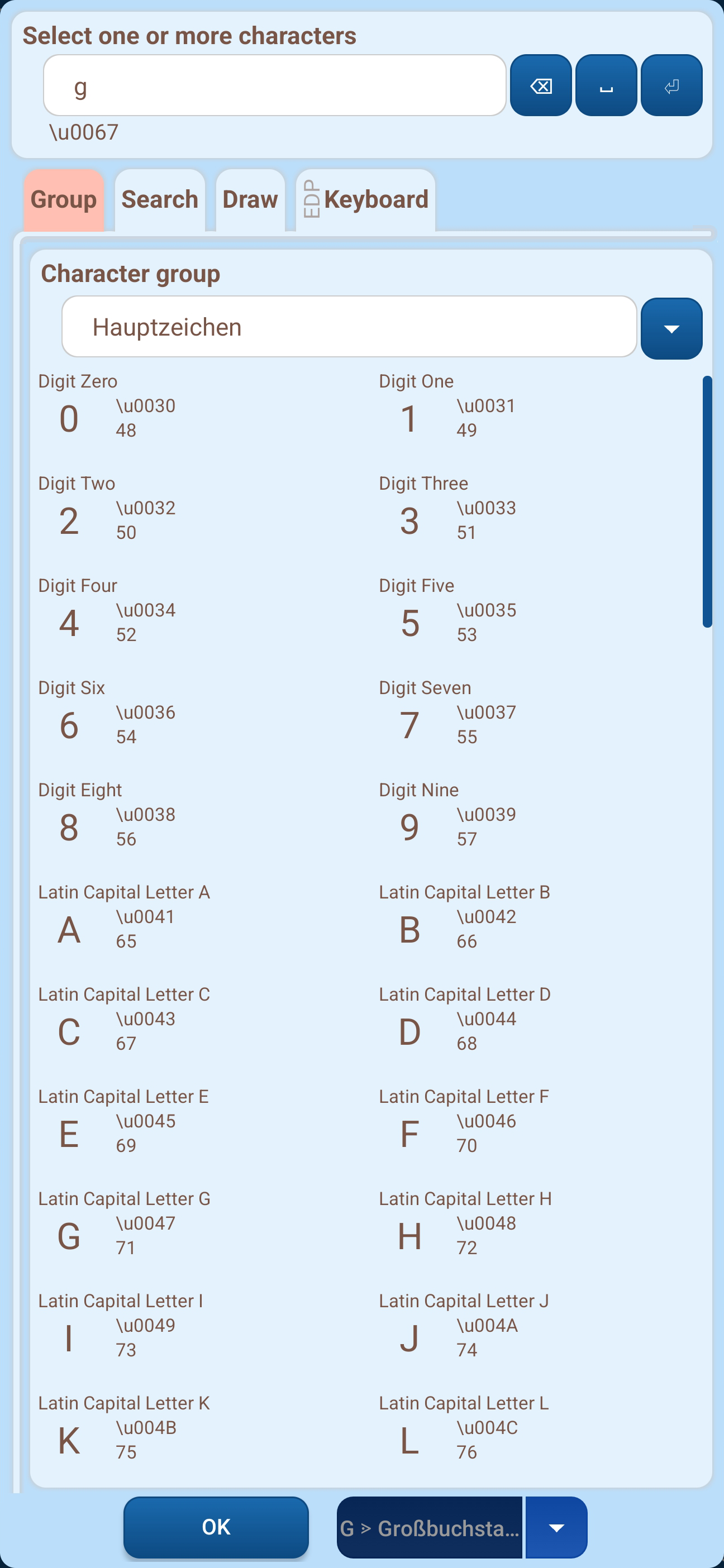
The character selector lets you compose one or more characters – both for the symbol of a key and for the output to the input field. The symbol of a key can consist of any number of characters, the output of a maximum of three characters. The selected characters appear in the result box at the top.
To find a character, four tabs are available:
On the "Group" tab you first select a character group and then the desired character below it. Available are all characters supported by your device's Android version – the so-called Unicode character set. In addition to the individual Unicode groups, the Keyboard Designer offers the combined groups "Main characters", "Control Symbols" and "Emojis". For each character the English name and the Unicode code in hexadecimal (u) and decimal form are shown.
The "Search" tab opens a search field with which you search all groups at once – by the English name or by the Unicode code (decimal or hexadecimal).
On the "Draw" tab you simply draw the character you are looking for, and the Keyboard Designer suggests matching characters.
The "Keyboard" tab is part of the Extended Design Package: it lets you enter the character directly with your device's keyboard into the result box. Without the Extended Design Package this tab only shows a note.
Note: If you are not sure which character is shown in the upper text box, you can identify it unambiguously using the list of Unicode codes below.