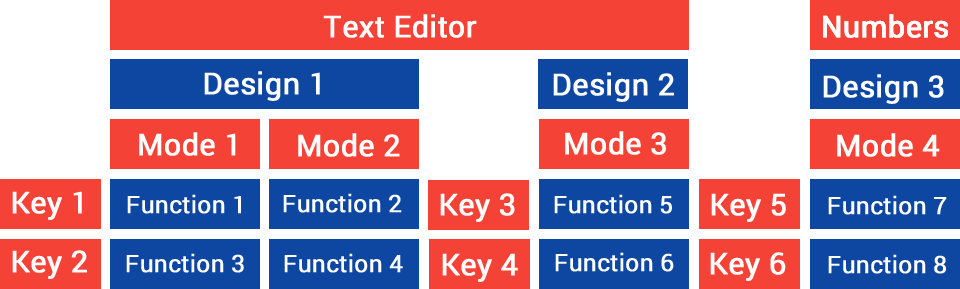
In order to keep the design of complex keyboards as simple as possible, the structure is mapped using the four terms design, mode, key and function. The graphic illustrates it.
For each type of editor (text, numbers, telephone) several designs can be created. To make a key usable multiple times within a design, multiple modes can be assigned to a design. A function can then be assigned to the combination of key and mode.
A key is determined by its size and position, which it keeps across all modes.
In fact, a whole range of functions can be assigned to the combination of key and mode, depending on the action taken. A distinction is made between press, hold, moving in the various directions (horizontal, vertical and diagonal, e.g. top-right or bottom-left) and rotating.
With the extended design package, a key can also use multi-press: depending on how often you press a key in quick succession, a different function is triggered.
The standard mode can be defined for each type of editor. You can also switch between modes while using the keyboard, via a function. In addition, you can specify which mode should be used automatically for capital letters.
After this classification of the terms, you should go through the designer tab by tab. Start with the design tab.